


ChargePoint
3.97.56K Reviews
App Specs
- Version
- Varies with Device
- Updated On
- License
- Free
- Downloads
- 1,000,000+
- Developer
- ChargePoint, Inc.
- Categories
- Maps & Navigation
- Platform
- Android, iOS
Screenshots
 Analysis by AppCompare
I treat EV charging apps as part of the journey, not as a rescue button to open only when the battery is low. That habit matters with ChargePoint: it works best when I check likely stops before setting off, then use the map and station details to make a sensible backup plan. It is a free Maps & Navigation app from ChargePoint, Inc., and its focus is practical—helping drivers locate charging places and make charging stops easier to manage.
A calmer way to plan a charging stop
My usual workflow is to look for chargers near where I expect to pause, rather than simply choosing the closest marker on a map. A station beside a café, shop, or place I already need to visit can make charging time feel useful instead of wasted. I then check the station information and recent driver feedback before committing to it. That extra glance is worthwhile: the nearest location is not automatically the most convenient one for my route or schedule.
For a longer drive, I would use the app as one planning aid, not as a promise that every stop will work exactly as expected. I identify a primary option and a nearby alternative where possible, then avoid leaving the decision until the last stretch of battery. This is especially helpful when traffic, weather, or a change of plans could alter how far I want to travel before charging. The app’s value is strongest when it helps me make those decisions early.
Details worth checking before you drive
Availability is useful, but I would still treat it as a snapshot rather than a guarantee. A charger can become occupied between checking the map and arriving, so I build in a backup when the stop is important. Reviews can add context that a map pin cannot: another driver’s notes may help me judge whether a location is easy to reach or suits a quick break. I look for recent, practical comments rather than relying on a rating alone.
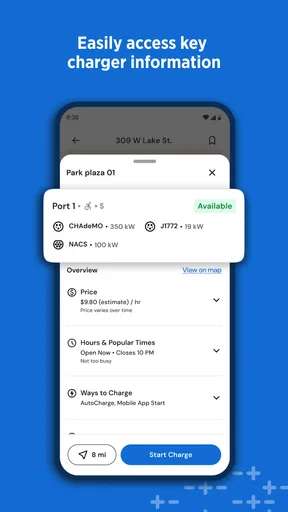
Before depending on a station, I also check that its details fit my vehicle and charging needs. That small step can prevent a frustrating detour to a location that is nearby but unsuitable. If I am travelling somewhere unfamiliar, I prefer to compare more than one candidate and choose the one that makes sense for the whole stop, not just the charging point itself.
Useful habits for regular drivers
For repeat journeys, I find it helpful to remember which locations have worked well and to check them again before leaving. A familiar stop can simplify a routine commute or weekend trip, while a fresh look at availability helps avoid assuming that yesterday’s convenient option is open today. I also keep my phone ready before pulling into a charging area, so I can focus on the station and the next step rather than searching through the app while parked in an awkward spot.
ChargePoint has an average rating of 4.2 from around 53,000 ratings, and it has been installed more than a million times. Those figures suggest a broad user base, though they cannot tell me whether a particular charger near my home is reliable or convenient. I would judge the app by the stations available on the routes I actually use. It is rated for Everyone, costs nothing to download, and has been available since June 2011.
Worth Reading Before You Choose

EA SPORTS FC Mobile 26 Is a Bigger Football Game, but It Takes Time

Flipboard Shows What News Apps Must Do Beyond the Feed

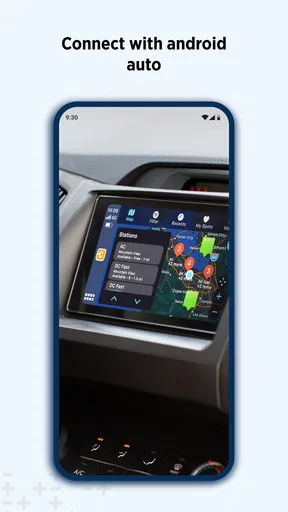
Switching to Android Auto Means Rethinking Your Driving Routine

Google Calendar Makes a Crowded Week Easier to Manage

Ludo King Makes the Most of the Minutes Between Plans

Baby Panda World Brings Quick Play to Modern Phones, but Its Game Library Feels Busy
ChargePoint at a Glance
So, what exactly is ChargePoint? It's an app that connects you to one of the largest networks of EV charging stations around the globe. Whether you're cruising through the city or embarking on a cross-country road trip, this app's got your back, ensuring you never run low on juice.
Features That Stand Out
Alright, let's dive into some of the cool features that make this app a must-have for EV drivers:
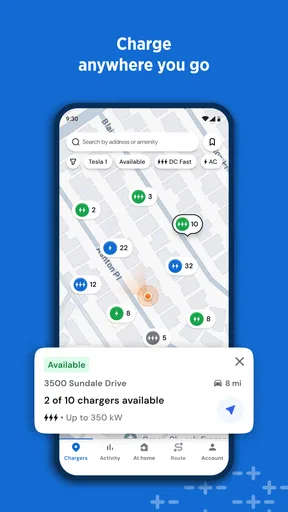
- Real-time Station Availability: No more guessing games. You can see which stations are available in real-time, helping you plan your charging stops efficiently.
- Easy Payment Options: Say goodbye to fumbling around for loose change. The app offers various payment methods right at your fingertips, making transactions a breeze.
- Station Reviews and Ratings: Just like you’d check reviews for a restaurant, you can read what other drivers have to say about a particular station. It’s a community-driven feature that I absolutely love.
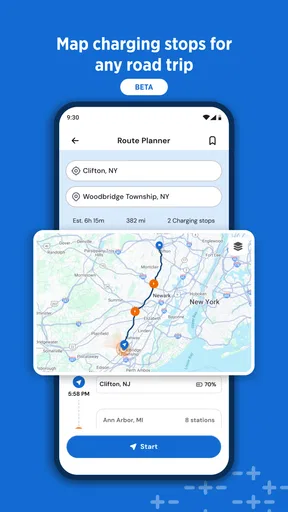
- Trip Planner: This is a game-changer. You can plan your entire trip, factoring in charging stops along the way. It’s like having a travel buddy who knows all the best charging spots.
User Experience
The app’s interface is sleek and intuitive. Even if you’re not a tech whiz, you’ll find it easy to navigate. The map feature is particularly impressive, showing a detailed view of all nearby stations. Plus, the app’s design is visually appealing, which is always a bonus in my book.
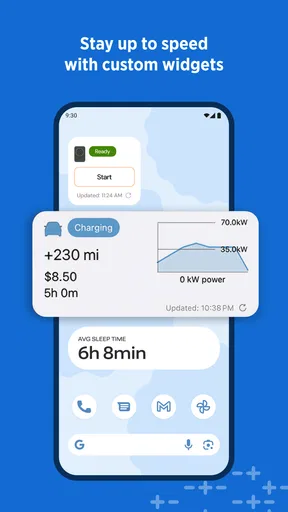
An interesting tidbit is how the app notifies you when your car is fully charged. It’s like having a personal assistant reminding you to unplug and hit the road again. This feature is especially useful if you’re the type to get lost in a book or a podcast while waiting.
Community and Support
One of the things I appreciate about ChargePoint is the sense of community it fosters. With user-generated reviews and ratings, you feel connected to other EV drivers who are navigating the same roadblocks (pun intended) as you are.
If you ever run into issues, the app's customer support is top-notch. They’re quick to respond and genuinely helpful, which is something I always value in a service.
Where it fits—and where it does not
I would recommend keeping this app handy if you drive an EV and want a dedicated way to look for charging stations, especially when a route takes you beyond your familiar neighbourhood. Its map, station feedback, availability information, and trip-planning tools give me several ways to assess a stop. The practical benefit is not simply finding a pin; it is having enough context to choose a stop that fits the trip.
It is less compelling as my only source of truth. Drivers who already rely on a vehicle’s built-in navigation or another mapping app may prefer those tools for turn-by-turn directions and use ChargePoint to investigate charging options. Likewise, if your routine is limited to a single dependable charger and you rarely travel, a dedicated charging map may not change much. I would install it for flexibility, not because every EV owner needs to replace their existing navigation habits.
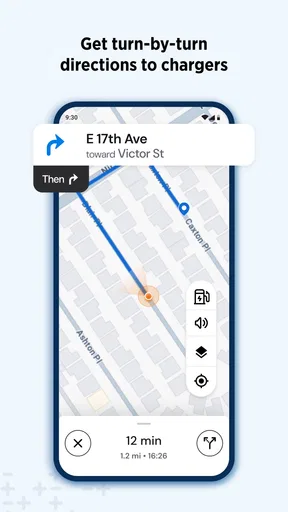
The comparison with general map apps comes down to purpose. A general map is usually where I start when I need directions or want to combine errands; ChargePoint is more useful when the charging stop itself needs attention. I can use the two together: find candidate chargers here, then check the wider route and surrounding destinations in my regular navigation tool. That division keeps each app focused and reduces the chance that a convenient-looking charger becomes an awkward detour.
A realistic day on the road
Imagine I have a morning appointment across town and plan to run an errand afterward. Before leaving, I can check stations near the errand rather than assume I should charge at the closest one to the appointment. If one location appears occupied or has unhelpful recent feedback, I can consider another nearby option before I set out. Once parked, I can start charging and use the app’s notification as a reminder to return when the car is ready, instead of keeping an eye on the time throughout the stop.
That workflow also shows why I would not wait until the battery feels critical to open the app. Under time pressure, I am more likely to settle for the first result and less likely to notice a better-located alternative. A quick check while planning the day gives me room to choose. On a road trip, I would apply the same idea at a larger scale: decide on a likely stop, keep a second possibility in mind, and recheck conditions before relying on either one.
Small decisions that make it more useful
One useful habit is to read station comments for operational clues, not just praise or complaints. A note about access or the surrounding area may matter more to my visit than a broad impression of the site. Another is to treat availability as something to verify close to arrival, particularly if the charging stop is essential to continuing the journey. Neither habit requires special settings; they are simply ways to use the information with sensible caution.
I also avoid planning a stop around a single app screen. I check the station details, consider whether the location suits the time I have, and keep a fallback in mind when the consequences of a failed stop would be inconvenient. This is a modest but important trade-off: more checking takes a little time before departure, yet it can save a larger interruption later. For everyday local driving, I may only need a quick scan; for an unfamiliar route, I give the decision more attention.
What to expect from the experience
The app is most useful when its station information matches the places you need to go. Its overall popularity cannot guarantee good coverage on a particular rural stretch, or tell me how a specific site will behave on the day. I would check the map for my own commute and common destinations before making it part of a regular routine. If the results are sparse where I drive, I would pair it with the vehicle’s navigation or another charging directory rather than assume one service can cover every trip.
It also helps to separate finding a charger from completing a charging session. The app can make station discovery and planning more convenient, but I still need to follow the instructions at the location and allow for real-world changes such as another driver arriving. Payment options are part of the appeal, but I would review what the chosen station requires before depending on a particular payment method. That is a sensible check for any charging stop, especially when travelling somewhere unfamiliar.
My final take for EV drivers
In a nutshell, if you drive an electric vehicle, ChargePoint is an app you shouldn’t be without. It combines convenience, community, and comprehensive features to ensure your EV adventures are as smooth as possible. So next time you’re planning a trip, give it a whirl and see how it transforms your driving experience.
My more measured recommendation is to try it against the routes and stops you actually use. If it helps you compare nearby options, check on availability, and build a backup before a longer drive, it earns a place on my phone. If your preferred navigation already handles charging stops well or the app’s map does not suit your area, it may be better as a secondary tool—or not part of your routine at all. I would rather use it thoughtfully than trust any single map without a plan.
Now, go ahead and hit the road with confidence, knowing that ChargePoint has got you covered. Safe travels!
Pros
- User-friendly interface simplifies navigation.
- Extensive network of charging stations available.
- Real-time status updates for charging stations.
- Flexible payment options including PayPal and credit cards.
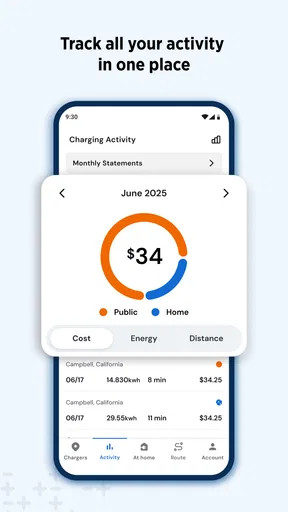
- Detailed charging history and usage reports.
Cons
- Limited support for certain electric vehicle models.
- Some stations may have connectivity issues.
- Occasional app crashes reported by users.
- Inconsistent customer support response times.
- Requires account setup before first use.
FAQs for ChargePoint
What is ChargePoint, and how does it work?
ChargePoint is a comprehensive electric vehicle (EV) charging network that allows users to locate, start, and pay for charging sessions directly from their mobile app. It offers a user-friendly interface that displays available charging stations, session details, and costs. The app also provides real-time updates and notifications to ensure a seamless charging experience.
Is ChargePoint compatible with all electric vehicles?
Yes, ChargePoint is designed to be compatible with a wide range of electric vehicles. Most charging stations support both Level 2 and DC fast charging, catering to different EV models. However, it's always a good idea to check your vehicle's compatibility with specific stations using the app before heading out.
How do I find and reserve a charging station using the ChargePoint app?
The ChargePoint app features an intuitive map that helps you locate nearby charging stations. You can filter results by charging speed, availability, and more. While some stations allow reservations, others operate on a first-come, first-served basis. Simply select your desired station, and follow the prompts to reserve or navigate there.
What are the costs associated with using ChargePoint?
Charging costs on ChargePoint can vary depending on the station and location. Some stations offer free charging, while others charge per session, per hour, or per kWh. The app provides detailed pricing information before you start a session, so you can make informed decisions about where to charge.
How does ChargePoint ensure the security of my payment information?
ChargePoint takes security seriously by employing robust encryption methods to protect your payment information. The app supports secure payment options, including credit cards and digital wallets. Regular updates and compliance with industry standards further ensure that your personal and financial data remains safe.


